Getting READY
- Finder - Preferences - Sidebar - check your Homefolder
- Editor - AppStore
- Tincta

OSX 10.8 and higher (free in AppStore little octupus)command + shift + . to show invisible files
- TextWrangler (only works on older operating systems; replaced by BBEdit-yuck!)
- Sublime (nice but 3rd party and only a free trial)
- ?
- Tincta
- Terminal - SpotlightSearch - Terminal - Options - Keep in Dock
Getting JAVA
-
Download & install proper version of Java for your machine from this website:
http://jdk.java.net/16/
(If doesn't work, try https://jdk.java.net/ )
Go to https://www.oracle.com/technetwork/java/javase/downloads/jdk13-downloads-5672538.htmlDownload: jdk-13.0.2_osx-x64_bin.dmg (As of Mar 23,2020)
It's a large file so depending on your connection may take a while to download so be patient.Double click icon to install. You can trash the DMG when done.
Getting Objectdraw.jar or Edu.tar
- CSci 157 ONLY - Intro to Programming
DOWNLOAD objectdrawV1.1.2.jarWhere? I suggest adding a subfolder to your home folder, JavaPkgs
and then drag/move the file you just downloaded into new folder
- CSci 257 ONLY - Data Structures
Go to http://ldale.sewanee.edu/CprS/257/admin/textbooks.phpDownload: edu.tar
Where? place file into a "new" subfolder in your home folder you'll name JavaPkgscd JavaPkgs Don't forget! tar xvf edu.tar
- Edit your .bash_profile found in your home folder.
export CLASSPATH=.:~/JavaPkgs/objectdrawV1.1.2.jar:$CLASSPATH-
CSci 157 ONLY - Intro to Programming
- DOWNLOAD 157 FILE & SAVE IN HOME FOLDER .bash_profile
-
CSci 257 ONLY - Data Structures
- DOWNLOAD 257 FILE & SAVE IN HOME FOLDER .bash_profile
Checking to see it all worked...
- Download the following java test files and TIAS
-
CSci 157 ONLY - Intro to Programming
- PrintfClient.java <----------- Checks Java
- ObjectdrawClient.java <----------- Checks objectdraw
-
CSci 257 ONLY - Data Structures
- PrintfClient.java <----------- Checks Java
- EduClient.java <----------- Checks import of book code imports
(Repetitive) Just some screenshots for #1 above...

| Open Finder |
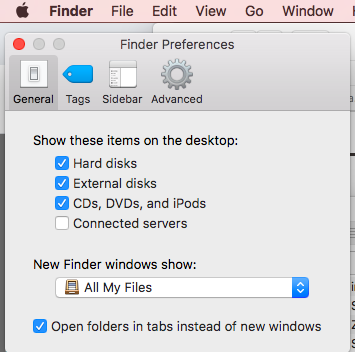
| then select Preferences... |
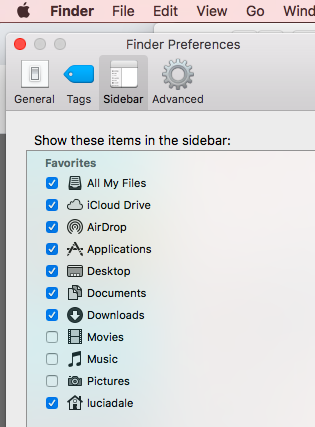
| then select Sidebar... |
| then select YOUR HOMEFOLDER ( For me, this is "luciadale" ) |